解决Adobe non genuine 弹窗禁用问题
一、新建防火墙出入网批处理文件
分别在 Adobe 软件的安装位置,例如:E:\Program Files\Adobe 根目录下, 和 Adobe 程序公共目录下:C:\Program Files\Common Files\Adobe 创建两个文件(文件名任意):
bounded_script.bat
@ setlocal enableextensions @ cd /d "%~dp0" for /R %%f in (*.exe) do ( netsh advfirewall firewall add rule name="Blocked: %%f" dir=out program="%%f" action=block netsh advfirewall firewall add rule name="Blocked: %%f" dir=in program="%%f" action=block ) pausecopy success
unbounded_script.bat
@ setlocal enableextensions @ cd /d "%~dp0" for /R %%f in (*.exe) do ( netsh advfirewall firewall add rule name="Blocked: %%f" dir=out program="%%f" action=allow netsh advfirewall firewall add rule name="Blocked: %%f" dir=in program="%%f" action=allow ) pausecopy success
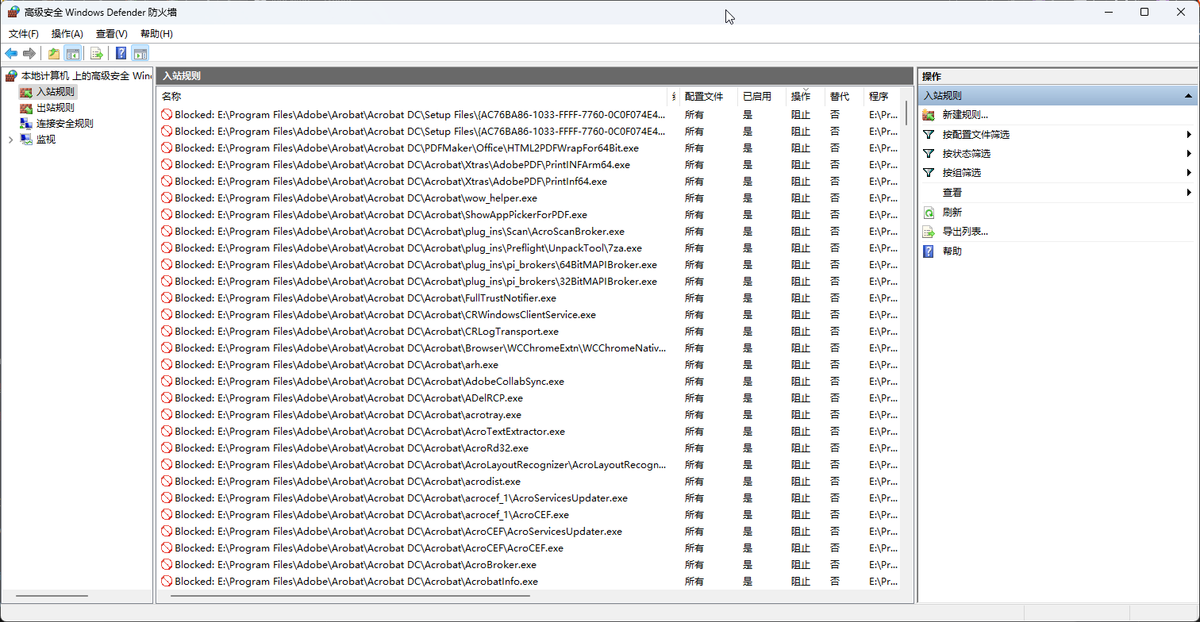
这两个批处理文件分别会递归的将所有子目录下的 .exe 扩展文件 加入 出站/入站 网络防火墙规则。 bounded_script.bat 是禁用, unbounded_script.bat 是删除配置的规则。
如果你对某些目录没有权限导致无法通过右键创建文件,可以使用超级管理员身份启动 Powershell 创建文件。
# 超级管理员 powershell New-Item -ItemType File -Path "C:\Program Files\Common Files\Adobe\bounded_script.bat" New-Item -ItemType File -Path "C:\Program Files\Common Files\Adobe\unbounded_script.bat" # 注意:这里的 E:\Program Files\Adobe 应该替换为你自己的安装目录 New-Item -ItemType File -Path "E:\Program Files\Adobe\bounded_script.bat" New-Item -ItemType File -Path "E:\Program Files\Adobe\unbounded_script.bat"copy success
写入文件内容保存后,右键 管理员运行 bounded_scritpt.bat 文件。
你可以在防火墙 - 高级设置 中验证禁用规则。